
Embroidery Digitizing is the process of converting artwork into stitch instructions that an embroidery machine can understand. The quality of the original artwork has a major effect on how accurately a design can be digitized. Among the most useful artwork formats for this purpose are vector files. Formats such as AI, EPS, SVG, and sometimes PDF can provide clean shapes, defined edges, and scalable artwork that make the digitizing process more efficient.
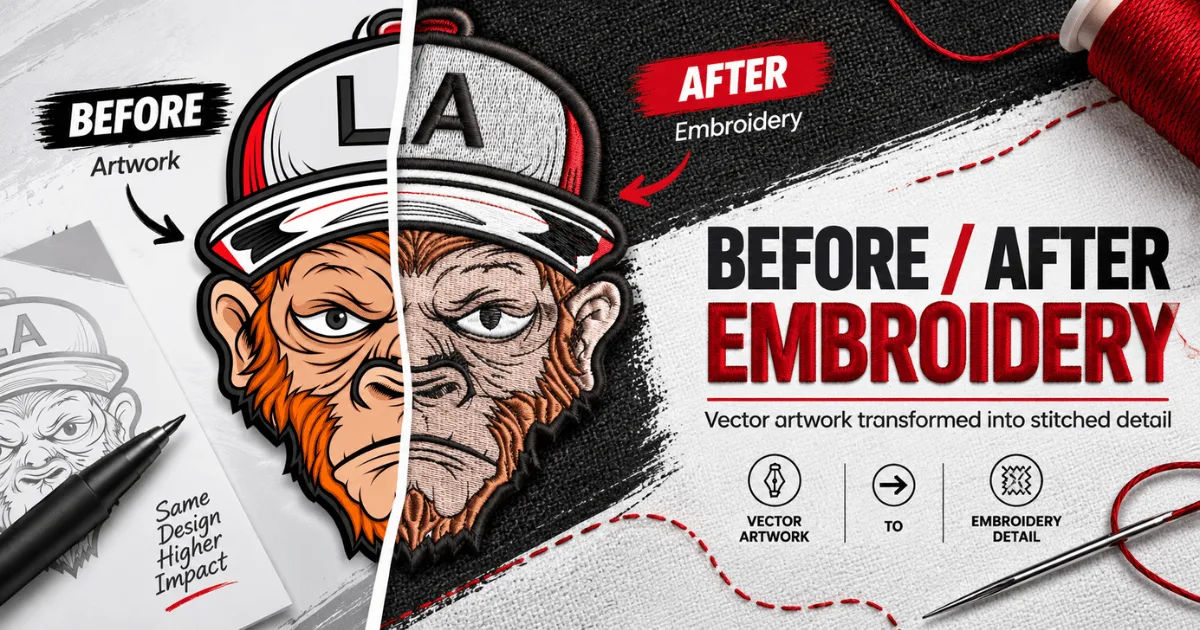
Vector files are especially helpful when a logo or design contains simple shapes, lettering, outlines, and solid colors. Unlike raster images, vector artwork is built from mathematical paths rather than fixed pixels. This allows a digitizer to examine individual design elements and recreate them as embroidery objects.
However, a vector file does not automatically become an embroidery design. It still needs professional preparation, stitch planning, density adjustments, underlay selection, and other technical decisions. This guide explains how vector files support the process, when they work best, their limitations, and how to prepare them properly.
What Is a Vector File?
A vector file is a digital graphic made from paths, points, lines, curves, and shapes. These elements are defined mathematically, allowing the artwork to be resized without losing its basic sharpness.
Common vector formats include:
- AI (Adobe Illustrator)
- EPS (Encapsulated PostScript)
- SVG (Scalable Vector Graphics)
- PDF when it contains editable vector artwork
- CDR (CorelDRAW)
Vector artwork is widely used for company logos, icons, signs, packaging, illustrations, and branding materials.
Vector Files vs. Raster Images
Raster images are made from pixels. JPEG, PNG, GIF, and BMP files are common examples.
If a small raster image is enlarged significantly, its edges can become blurry or pixelated. This can make it harder to identify precise shapes during digitizing.
Vector graphics do not have the same limitation. Their paths can generally be enlarged or reduced while maintaining clean edges.
This makes vector artwork a convenient starting point for embroidery projects.
How Vector Files Help Embroidery Digitizing
Vector artwork can simplify several stages of the digitizing workflow.
A digitizer can often identify the major shapes directly from the vector file. For example, a logo may contain a circle, rectangle, curved line, and several letters. Each of these elements can potentially be recreated as separate embroidery objects.
The clean structure of vector artwork can reduce the need to manually trace unclear edges.
Clear Design Boundaries
Embroidery machines place stitches according to defined paths and shapes. A clean vector file provides clear boundaries between different parts of the artwork.
This helps a digitizer determine where one embroidered object should end and another should begin.
For example, if a logo contains a solid red circle surrounded by a black border, the vector file can clearly show both shapes. The digitizer can then plan suitable stitching for each area.
Easy Scaling
A logo may need to appear on a shirt, jacket, cap, bag, or patch. Each application can require a different embroidery size.
Vector artwork can usually be resized without becoming pixelated. This makes it easier to prepare artwork for different dimensions before the digitizing stage.
However, changing the physical embroidery size still requires more than simply scaling the artwork. Stitch density, underlay, stitch length, and other settings may need adjustment.
Why Vector Artwork Is Valuable for Logos
Business logos are among the most common designs sent for embroidery. They often contain clean typography, geometric shapes, and limited colors.
These characteristics make vector files particularly useful.
A digitizer can inspect the logo and determine its individual components. Text can be separated from graphic elements, borders can be identified, and different color regions can be planned as separate stitch areas.
Better Control Over Shapes
A vector logo can provide precise information about curves and angles.
This is important for embroidery because poor shape interpretation can result in uneven borders or distorted elements.
With clean paths available, the digitizer has a stronger visual reference when creating the embroidery design.
Easier Color Identification
Vector artwork often separates colors into individual objects.
Suppose a logo uses blue, white, and black. The digitizer can identify these areas and plan the thread sequence accordingly.
The actual thread colors may not perfectly match the colors shown on a computer screen, but the vector artwork still provides a useful color reference.
Can Every Vector File Be Used Directly?
No.
Having a vector file does not mean the artwork is automatically ready for embroidery.
Some vector files contain unnecessary elements, overlapping objects, hidden shapes, excessive anchor points, or effects that are difficult to reproduce with stitches.
A professional digitizer may need to clean and simplify the artwork first.
Text May Need Special Attention
Text is a common problem.
A vector file may contain editable fonts, but the digitizer still needs to consider the physical size of the lettering. Very small letters can lose their clarity when embroidered.
Thin lines may also disappear or become inconsistent because embroidery thread has physical thickness.
Therefore, text often needs to be adjusted specifically for embroidery.
Complex Effects Can Be Difficult
Vector artwork can contain gradients, shadows, transparency, glows, and other visual effects.
These effects may look excellent on a screen but cannot always be reproduced directly through conventional embroidery.
A digitizer may need to reinterpret them using thread colors, stitch directions, density changes, or simplified shapes.
What Makes a Vector File Good for Digitizing?
A good vector file should be clean, organized, and as close as possible to the intended final design.
Several characteristics can make the artwork easier to work with.
Clean Paths
Unnecessary points can make curves complicated.
Clean paths with sensible anchor points are easier to understand and edit. They can also help prevent confusion between overlapping objects.
Correct Shapes
The artwork should accurately represent the intended logo or design.
If an object is incomplete, distorted, or accidentally duplicated, those problems can carry into the digitizing workflow.
Organized Layers
Layer organization can be extremely useful.
When different design components are placed on understandable layers, the digitizer can quickly identify the artwork's structure.
For example, separate layers for text, borders, icons, and background elements can make the design easier to interpret.
How the Digitizer Converts Vector Artwork Into Stitches
The process involves several technical stages.
First, the artwork is examined to understand its size, shapes, colors, and complexity. The digitizer then determines how each area should be embroidered.
Different objects may require different stitch types.
Choosing Stitch Types
Common embroidery stitch types include:
- Satin stitches
- Fill stitches
- Running stitches
- Column stitches
- Tatami-style fills
- Decorative stitches
A narrow border might work well with a running stitch or satin stitch, depending on its dimensions. A larger filled area may require a fill stitch.
The choice depends on the artwork and the fabric.
Setting Stitch Direction
Stitch direction can influence both appearance and stability.
Different sections of a design may use different stitch angles. Changing direction can help create visual separation between objects and may also improve the finished appearance.
For example, two neighboring filled sections can use different stitch directions to make their boundaries more visible.
Adding Underlay
Underlay stitches are placed beneath the visible stitching.
They can help stabilize fabric, support the top stitches, and improve coverage.
The appropriate underlay depends on factors such as fabric type, design size, stitch type, and density.
A vector file does not contain this embroidery information. The digitizer must create it.
Vector Files Do Not Contain Embroidery Instructions
This distinction is important.
An AI or SVG file describes artwork. An embroidery file describes how an embroidery machine should stitch that artwork.
These are fundamentally different types of information.
An embroidery machine may use formats such as DST, EXP, PES, JEF, or other machine-specific formats.
A vector file generally needs to be converted into a proper embroidery file through digitizing software and professional decision-making.
Artwork and Stitch Data Are Different
A vector file might say that a shape is a blue circle.
An embroidery file needs to specify things such as:
- Where stitching begins
- Where it ends
- Stitch direction
- Stitch length
- Density
- Underlay
- Thread changes
- Travel paths
- Trim commands
- Machine stops
Therefore, vector artwork is a starting point rather than a finished embroidery file.
Vector Files Can Improve Digitizing Accuracy
When the artwork is clean, vector files can help reduce interpretation errors.
A digitizer does not have to guess where a sharp edge should be located or where a curve begins and ends.
This can be especially valuable for professional logos where maintaining brand proportions is important.
Preserving Brand Identity
Companies often have strict rules for their logos.
A small change in letter spacing, shape, or proportion can make an embroidered logo look different from the original.
Vector artwork provides an accurate reference for these elements.
The digitizer can then adapt the artwork for embroidery while trying to preserve its recognizable appearance.
When Raster Artwork May Still Be Needed
Vector files are useful, but they are not always the only necessary source.
Sometimes a customer has only a JPEG or PNG version of a design. A skilled digitizer can work from that artwork as well.
In some cases, a high-resolution raster image may provide visual information that is not included in the vector version.
For example, a detailed illustration may contain texture, shading, or visual effects that need to be interpreted manually.
High-Resolution Raster Images
If no vector file is available, a high-resolution PNG or TIFF can be a helpful alternative.
The clearer the original image, the easier it may be to understand small design details.
However, low-resolution images can create challenges because blurred edges make it harder to identify the exact boundaries of objects.
Common Problems With Vector Files
Not every vector file is professionally prepared.
Some files may contain issues that increase the amount of work required before digitizing.
Too Many Anchor Points
Excessive anchor points can make curves unnecessarily complicated.
Cleaning these paths can produce a more manageable design.
Overlapping Objects
Overlapping shapes may create unexpected results.
A background object might accidentally cover another element, or multiple objects may occupy the same space.
The digitizer needs to understand which elements should appear on top.
Unconverted Fonts
If a vector file contains editable text, the required font may not be available on another computer.
Converting text to outlines can help preserve the intended letter shapes.
However, outlined text still needs to be evaluated for embroidery suitability.
Preparing a Vector File Before Sending It
If you are giving artwork to a digitizer, a few simple preparations can make the process easier.
Use the Original Artwork
Whenever possible, provide the original vector artwork rather than a screenshot or compressed image.
Original files generally provide more useful information.
Include the Correct Dimensions
Tell the digitizer the intended finished embroidery size.
A logo intended for a small chest placement may require different treatment from the same logo intended for a large jacket back.
Specify the Fabric
The fabric matters.
Cotton, denim, fleece, leather, caps, performance fabrics, and stretchy materials can behave differently during embroidery.
Providing this information allows the digitizer to make better technical decisions.
Mention the Placement
The location of the design also matters.
A left-chest logo, sleeve design, cap front, jacket back, and patch can each require different considerations.
How Vector Files Affect the Cost of Digitizing
The quality of the supplied artwork can influence the amount of preparation required.
A clean vector logo may require less artwork cleanup than a low-resolution image.
However, the final cost of digitizing depends on more than the artwork format.
Factors can include:
- Design complexity
- Number of stitches
- Number of colors
- Final dimensions
- Fabric type
- Required file formats
- Cleanup requirements
- Testing and revisions
Therefore, providing a vector file does not necessarily guarantee a lower price, but it can make the initial artwork preparation more efficient.
Testing Is Still Essential
Even excellent artwork cannot guarantee a perfect embroidered result on the first attempt.
A design should ideally be tested on the intended or similar fabric.
Testing can reveal issues such as:
- Thread gaps
- Excessive density
- Fabric puckering
- Poor registration
- Weak small lettering
- Uneven coverage
- Unwanted distortion
The digitizer can then make adjustments.
This is why professional Embroidery Digitizing involves both artwork interpretation and practical embroidery knowledge.
Best Practices for Using Vector Files
For the best results, consider the following practices:
- Provide the original vector file whenever possible.
- Convert important text to outlines if requested by the digitizer.
- Remove unnecessary artwork elements.
- Clearly identify the intended colors.
- Specify the finished embroidery dimensions.
- Tell the digitizer what fabric will be used.
- Explain the intended placement.
- Request a stitch-out when accuracy is especially important.
- Avoid assuming that screen artwork will look identical when embroidered.
- Allow technical adjustments to improve the physical result.
Frequently Asked Questions
Is a vector file better than a JPEG for embroidery?
In many cases, yes. A clean vector file provides scalable shapes and defined paths, which can make artwork interpretation easier. However, a skilled digitizer can also work effectively from a high-quality raster image.
Can an SVG file be converted directly into an embroidery file?
An SVG can provide useful artwork information, but it generally needs to be processed in suitable embroidery software. The design still requires stitch planning and technical settings before it can be used by an embroidery machine.
Does a vector file contain stitch information?
No. A vector file describes graphic artwork rather than embroidery instructions. Stitch information must be created during the digitizing process.
Is PDF suitable for digitizing?
A PDF can be useful if it contains genuine vector artwork. However, some PDFs contain only raster images, so the file's internal structure matters.
Can complex logos be digitized from vector files?
Yes, complex logos can often be digitized from vector artwork. However, complicated details may need to be simplified so they remain clear when stitched.
Conclusion
Vector files can be extremely valuable for professional Embroidery Digitizing because they provide clean, scalable, and clearly defined artwork. They allow digitizers to understand shapes, boundaries, colors, typography, and proportions more easily than many low-quality raster images.
However, a vector file should not be viewed as a ready-to-use embroidery design. It is an artwork source that must be translated into practical stitch instructions. The digitizer still needs to choose appropriate stitch types, determine stitch directions, establish density, add underlay, plan thread changes, and consider the fabric and final design size.
The best results come from combining high-quality vector artwork with experienced digitizing. Providing the original artwork, intended dimensions, fabric information, placement, and color requirements can make the workflow more efficient and reduce unnecessary revisions.
Ultimately, vector artwork gives the digitizer a strong foundation, but professional Embroidery Digitizing turns that foundation into a functional, attractive, and durable embroidered design. When artwork preparation and stitch planning are handled carefully, the final embroidery can maintain the important visual qualities of the original design while being adapted to the physical realities of thread and fabric.